An address book in a spreadsheet works fine, until you want to link it to other scripts or automations. A simple MySQL database gives you more flexibility — and it’s a good way to get to grips with databases and Bash scripting.
In this example, the database is running on a Synology NAS with MariaDB, but it will work on any MySQL/MariaDB instance.
The full code is available on GitHub: github.com/siekman-io/contacten
Requirements
- A MySQL client on your machine (macOS, Linux)
- A running MySQL or MariaDB server
- A user with permissions to create databases
Installing the MySQL client on macOS
/bin/bash -c "$(curl -fsSL https://raw.githubusercontent.com/Homebrew/install/HEAD/install.sh)"
brew update
brew install mysql-client
Testing the connection
First, check whether you can connect to the database:
mysql -u username -p -h 10.0.0.1Replace 10.0.0.1 with your server’s IP address (or localhost if the database is running locally).

If you see the mysql> prompt, the connection is working. Exit the client by typing exit.
Setting up a project structure
Create a folder for the scripts and configuration:
mkdir ~/contacts
cd ~/contacts
The folder contains four files:
contacts/
├── config # database details
├── contacts.sql   # table schema
├── create_db.sh    # create database
└── add-contact.sh  # add contact
Configuration file
Create a file called config containing your database details:
#!/bin/bash
HOST=10.0.0.1
DB=address_book
TABLE=address_book
USER=username
PASSWORD=password
Database schema
Create contacts.sql with the following table structure:
CREATE TABLE address_book (
    ID INT AUTO_INCREMENT PRIMARY KEY,
    First_name VARCHAR(50),
    Middle_initial VARCHAR(20),
    Surname    VARCHAR(50),
    Street    VARCHAR(100),
    House number    VARCHAR(10),
    Postcode VARCHAR(10),
    Town    VARCHAR(50),
    Country VARCHAR(50)
);
Creating a database
Create create_db.sh:
#!/bin/bash
source config
mysql -u$USER -p$PASSWORD -h $HOST -e "CREATE DATABASE $DB"
mysql -u$USER -p$PASSWORD -h $HOST $DB < contacts.sql
echo "Database created."
Grant execution permissions and run the script:
chmod +x create_db.sh
sh create_db.sh
Add a contact
Create add-contact.sh. This script prompts you interactively for the details and writes them to the database:
#!/bin/bash
source config

read -p "First name: " first_name
read -p "Middle name: " middle_name
read -p "Surname:    " surname
read -p "Street name:    " street_name
read -p "House number:    " house_number
read -p "Postcode:      " postcode
read -p "Town/city:    " town/city
read -p "Country: " country

mysql -u$USER -p$PASSWORD -h $HOST $DB -e "
INSERT INTO $TABLE
  (First name, Middle name, Surname, Street name, House number, Postcode, Town, Country)
VALUES
  ('$first_name','$middle_initial','$surname','$street_name','$house_number','$postcode','$town','$country')
"
echo "Contact saved."
chmod +x add-contact.sh
sh add-contact.sh
Result
After adding a contact, you can check the data via phpMyAdmin or directly via the terminal:
mysql -u$USER -p$PASSWORD -h $HOST $DB -e "SELECT * FROM address_book;"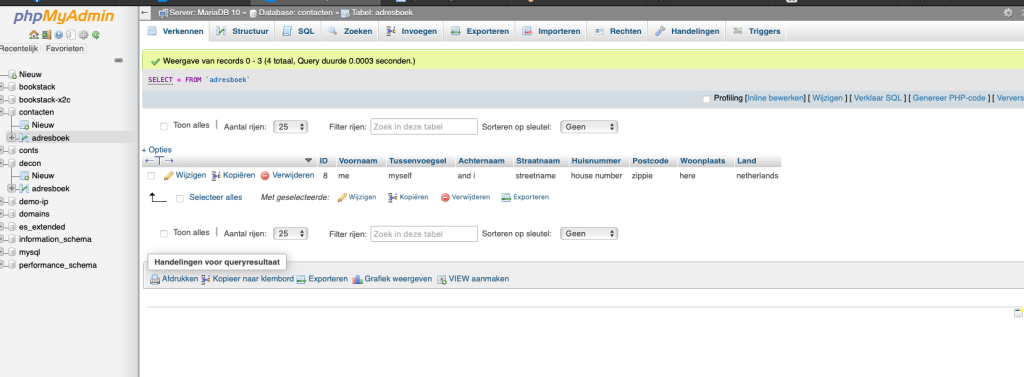
Next steps
This is a deliberate initial structure. Options for expansion:
list-contacts.sh— display all contacts with filteringsearch-contact.sh— search by name or postcodedelete-contact.sh— delete by ID- Retrieve the password from
configand configure it via.my.cnfso that it is not stored in plain text
Does this also work on a Synology NAS?
Yes, Synology DSM has a built-in MariaDB package. Install it via the Package Centre, enable remote connections and use your NAS’s IP address as the host.
Do I need phpMyAdmin?
No, phpMyAdmin is optional — it’s useful for checking the data. The scripts run entirely via the command line.
Can I adapt the scripts for other fields?
Yes, amend the SQL schema in contacts.sql and add the corresponding queries to add-contact.sh.
Lees het origineel in het Nederlands
← Lees in het Nederlands