
If you manage dozens of domains, it’s easy to lose track of renewal dates. Keeping a spreadsheet works, but it’s prone to errors. DomainReminder solves this: the script retrieves all renewal dates via the TransIP API and adds them directly as reminders in Apple Calendar — 14 days before the expiry date.
The full code is available on GitHub: github.com/siekman-io/domainreminder
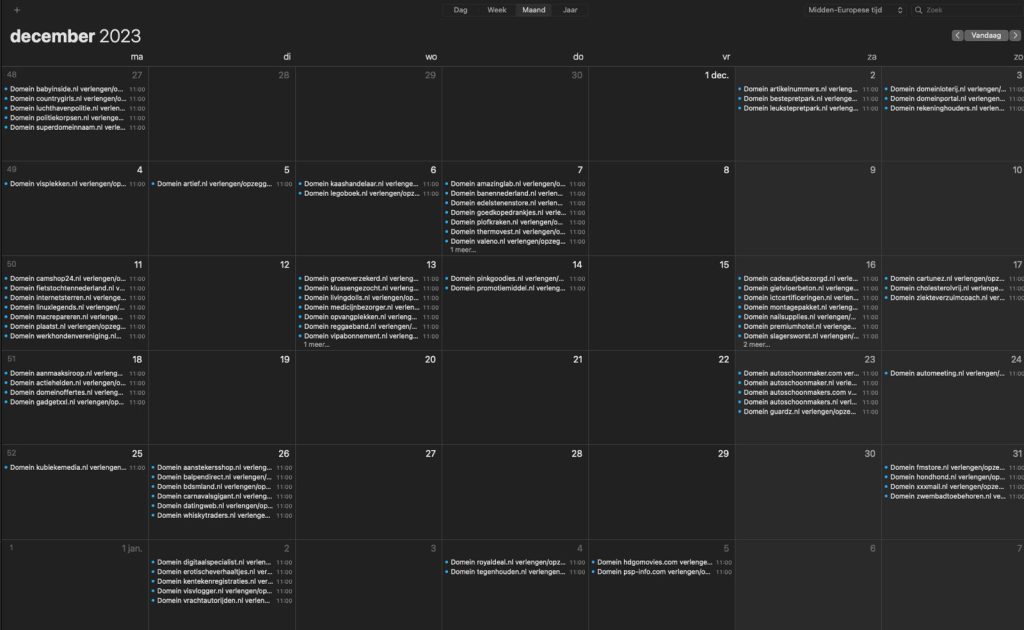
What does the script do?
- Retrieves all domains from your TransIP account via the API
- Creates a calendar event for each domain 14 days before the renewal date
- Saves the corresponding cancellation command in the event notes
- Automatically synchronises via iCloud to all your Apple devices
- If you run the script again, the events will be updated with the latest dates
Requirements
- Mac running macOS
- Python (pre-installed on macOS)
jq— command-line JSON parser- TransIP API access (private key)
Installing jq
brew install jqDon’t have Homebrew yet? Install it first:
/bin/bash -c "$(curl -fsSL https://raw.githubusercontent.com/Homebrew/install/HEAD/install.sh)"Installation
Clone the repository:
git clone https://github.com/siekman-io/domainreminder.git
cd domainreminder
Save your TransIP private key:
nano ~/.ssh/transipPaste the private key from your TransIP control panel here (My Account → API → Generate Keys).
Set your calendar name:
nano ~/domainreminder/varsChange the variable CALENDAR to the name of the calendar in Apple Calendar where the appointments are to be added, for example Domains.
Usage
Grant the scripts execute permissions and run them:
chmod +x domainreminder.sh cancel.sh
./domainreminder.sh
The script runs through all your domains and creates an appointment for each one. Open Apple Calendar and you’ll see all the renewal dates clearly organised.
Cancelling a domain
The cancellation command is included in the notes for each calendar appointment. You can also enter it directly:
~/domainreminder/cancel.sh yourdomain.nlThis sends the cancellation via the TransIP API — no manual login is required.
Automation via cron
If you want to run the script automatically twice a year, add a cron job:
crontab -e0 9 1 1.7 * cd ~/domainreminder && ./domainreminder.shThis runs the script on 1 January and 1 July at 09:00.
Does DomainReminder also work with registrars other than TransIP?
No, the script specifically uses the TransIP API. For other registrars, you would need to adapt the API calls.
How often should I run the script?
Twice a year is enough — the reminders will then be updated with the current renewal dates. You can also set it up as a cron job.
What exactly does cancel.sh do?
cancel.sh sends a request to cancel a domain via the TransIP API. The command is also saved in the notes for the calendar appointment.
Lees het origineel in het Nederlands
← Lees in het Nederlands